AI writes the code. IssueFlow runs what happens next.
Turn a GitHub issue into a delivery workflow that can design, implement, validate, review, recover, merge and deploy using the coding agents you already use.
You decide where human judgment belongs. IssueFlow keeps everything else moving.
Free on one repo · No card · Runs on your machine
Design ready for your approval — the spec is published on the issue.
See human judgment in a real workflow
Watch IssueFlow pause for design approval, ask for a decision in GitHub, and continue after the answer is recorded.
Read the transcript
AI coding agents can move fast. But sometimes, the most useful thing they can do is stop and ask.
Here's a real example from IssueFlow, working on an improvement to its own interface. In this workflow, the agents prepare and review the design. Then, the process stops for the developer's approval. The developer reviews the proposed solution before implementation starts.
Once approved, the workflow continues through implementation, validation, security review, and code review.
But a planned approval isn't the only time human judgment matters. Later, a merge check fails. The agent identifies a problem with the check itself and asks how to proceed. Here's that question in GitHub with three options.
The developer chooses option B. Rerun the check and merge if it passes, with instructions for what to do if it fails again. That decision is recorded and the workflow continues. The run eventually completes validation and cleanup.
The idea is simple. A workflow that carries the work forward and brings you in when a decision needs your judgment.
If that sounds useful, explore IssueFlow at issueflow.cloud. IssueFlow is also looking for a handful of design partners to help shape what comes next.
What you'll see
From a GitHub issue to a merged change in three steps.
- 1
Sign in and connect a repo
Sign in with GitHub, install the IssueFlow GitHub App on the repositories you choose, and pick a workflow template to start from.
Templateimplementreviewmerge - 2
Run a worker on your machine
One install command from the portal. The worker runs the coding agents you already have, on your machine, with your own subscriptions.
your-laptop online - 3
Label an issue
Add the IssueFlow label. The issue runs through your workflow and comes to you only at the points you reserved for yourself.
#518 · Add CSV export to the audit logIssueFlowenhancement
The label that admits an issue is a setting of each solution. It’s IssueFlow by default, and you can rename it. Remove it from an issue and processing stops.
Fast code is not finished software.
A coding agent can write a change quickly. Shipping it still takes a design that holds up, checks that pass, reviews that catch what the agent missed, fixes for what failed, a clean merge and a deploy. Without something running all of that, you are the glue between every step.
- A design someone approvedyou, or a gate
- Validation and tests passingchecks
- Security and code reviewreviewers
- Rework when a review failssomeone
- Conflicts resolved, mergedsomeone
- Deployed and verifiedsomeone
When something fails, it goes where you routed it.
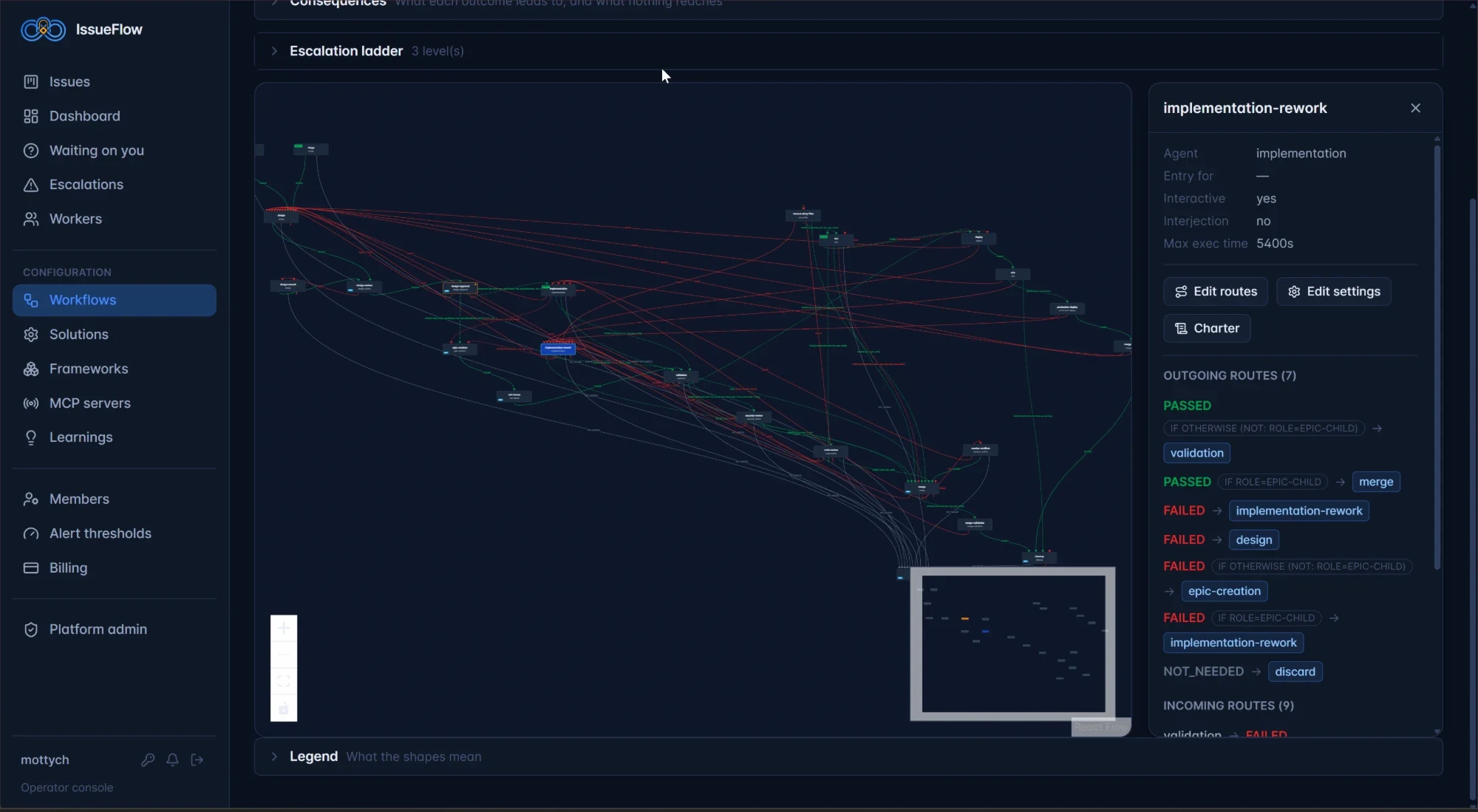
Every stage passes or fails, a failure carries its reason, and the reason picks what happens next. Here’s the workflow IssueFlow uses to build itself: a couple dozen stages, independent reviews, two lanes to ship, and every failure routed by its reason. Yours can look nothing like it.
| Fails with | Routes to |
|---|---|
requires-design-change | Back to design |
review failed | A dedicated rework stage |
merge-conflict | Conflict resolution |
ci-red | Rework |
transient merge block | Retries on its own |
A security violation, or anything no route covers, escalates — two agent resolvers first, then me.
You decide when. IssueFlow handles how.
IssueFlow doesn’t decide where you belong in the loop. It gives every agent a way to stop and ask — and makes sure the question reaches the right place.
You write the rule
Each agent’s charter says what’s worth stopping for: a design choice, a missing credential, a spec that can’t be built as approved — whatever matters to you.
You build the ladder
Choose who answers first and how many tries each level gets. Mine uses two agent resolvers before it reaches me. Yours can go straight to you.
IssueFlow runs the mechanism
The agent pauses mid-stage and the work waits safely. The question climbs your ladder and lands in your Waiting-on-you queue — or you answer from a GitHub comment. The same stage resumes with your answer.
- agent pauses and asks
- resolver · level 1
- resolver · level 2
- you
- same stage resumes
Set up your own ladder — start free“I gate design because that’s where my judgment matters most. Gate the PR, the deploy, every stage, or none — IssueFlow enforces whatever you decide.”
Motty Chen, founder
One queue for everything that needs you.
Every gate, question and escalation waiting on you, with its context and evidence — and an alert when spend, failures or stale work cross the limits you set.
- Token spend exceeds your limit over your window
- The failure ratio rises above your limit
- The cache-hit ratio falls below your floor
- Attempts exceed your limit
- Stale issues exceed your limit
You set every threshold and its window. Nothing is watched that you didn’t ask for.
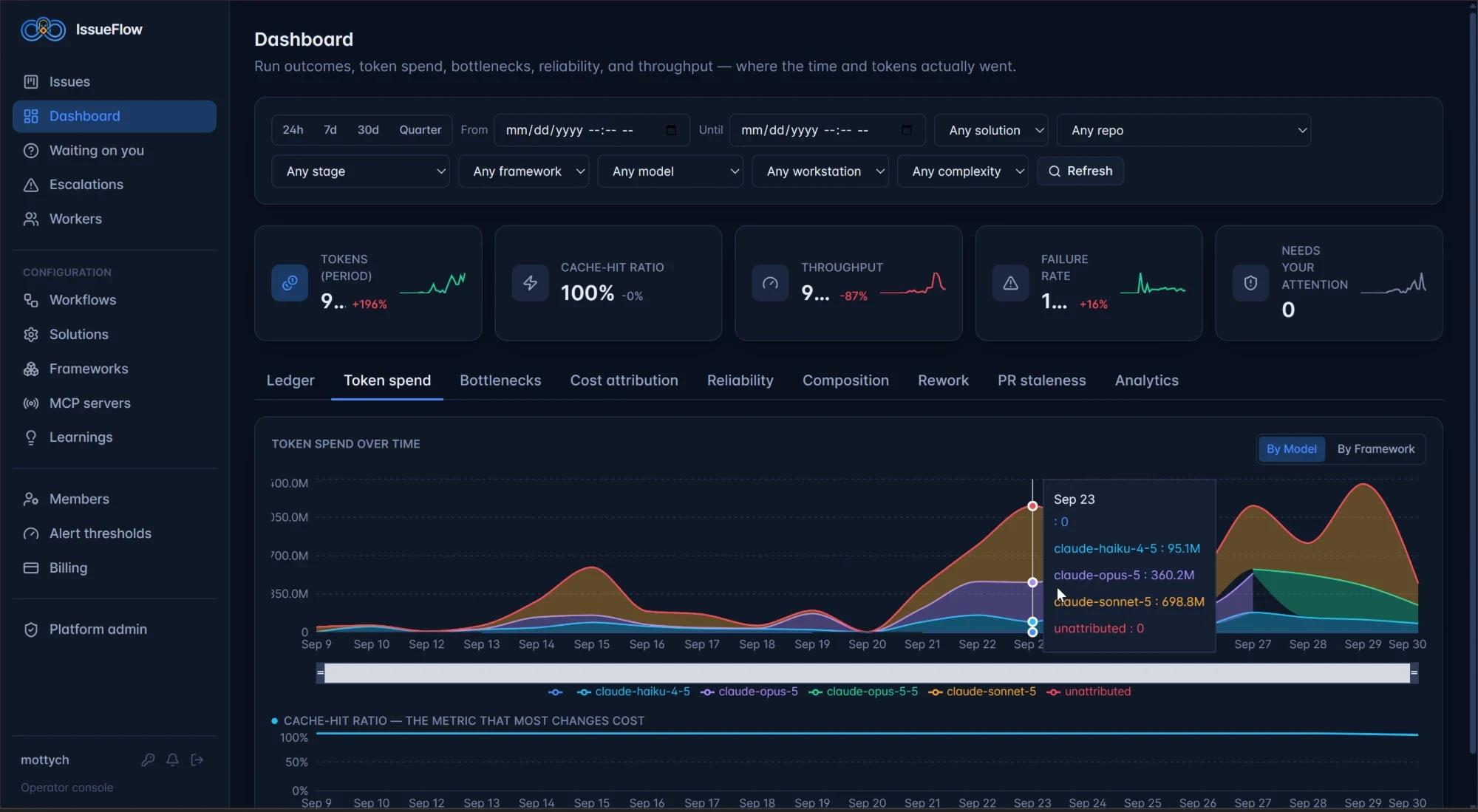
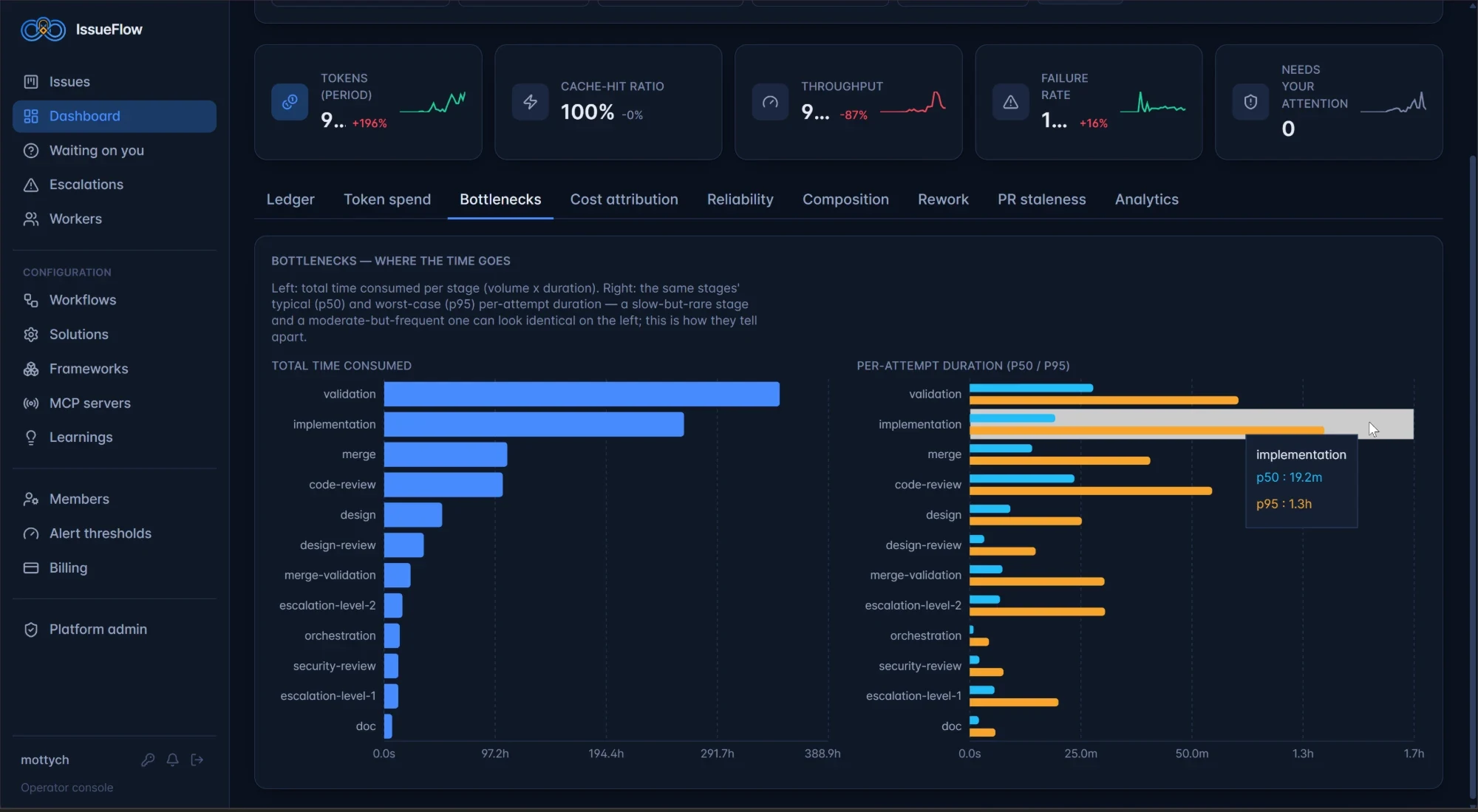
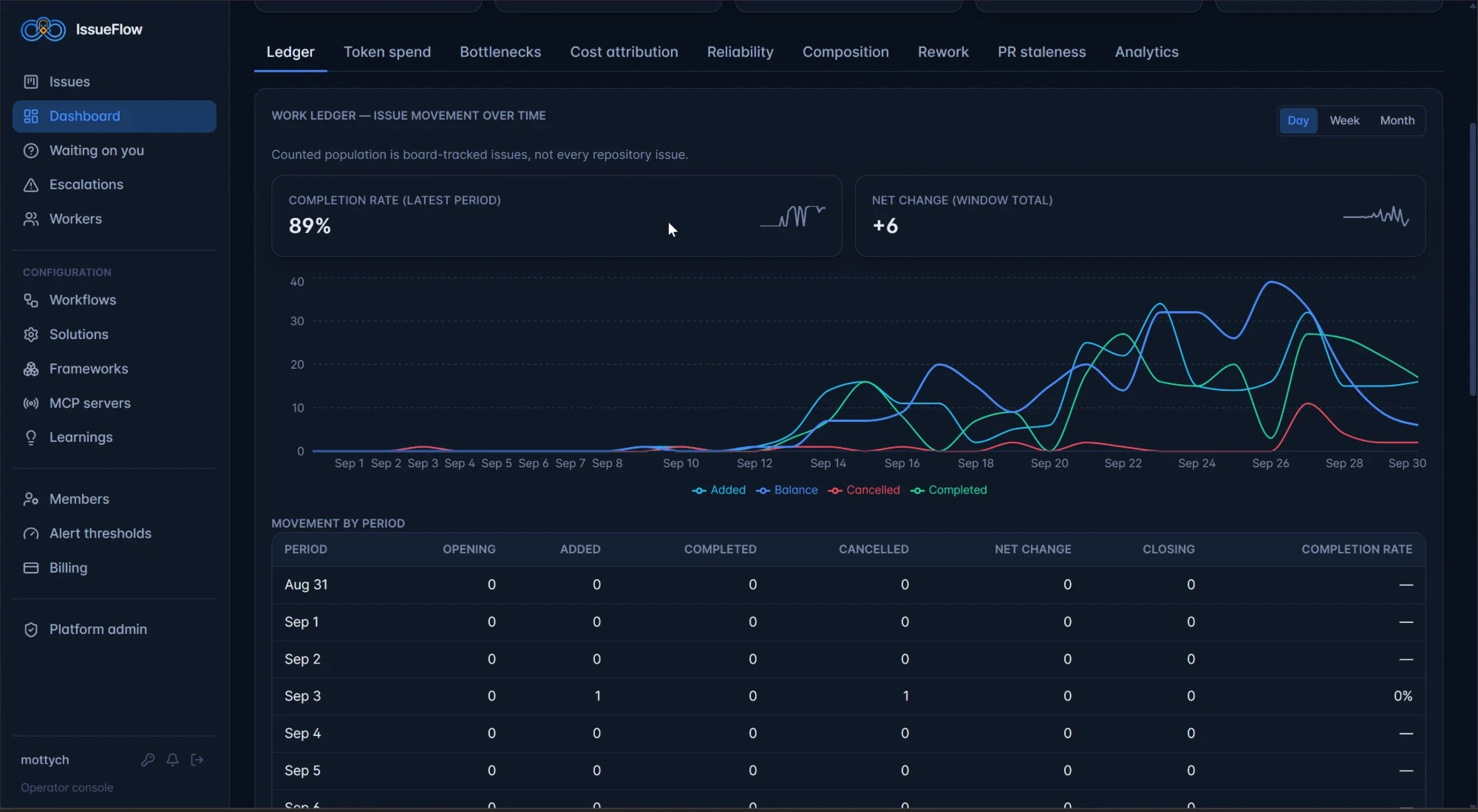
See where the time and the tokens actually went.
Ledger, token spend, bottlenecks, cost attribution, reliability, composition, rework and PR staleness — filterable by solution, repo, stage, framework, model, workstation and complexity. These are IssueFlow’s own numbers, from building itself.
Any agent, any script, any person.
Give each stage the executor that fits it, and change one without touching the rest of the workflow. Models are a per-stage setting.
You bring the agent subscriptions and API keys. IssueFlow charges a flat platform fee and never marks up your usage.
See every capabilityQueue everything. It runs in your order.
Hand IssueFlow the backlog for every product you’re building. It admits work in the priority order you declare, runs what it can in parallel, and parks what has to wait.
Your priority order
Name the levels — urgent, high, normal, low, or your own — and work is admitted in that order.
Concurrency and dependency guards
Parallel runs on the same repo don’t trip over each other, and an issue that depends on another waits for it.
Triage and decomposition
A vague report becomes concrete issues in the right repositories; an epic splits into sub-issues that ship together.
Multi-repo solutions
One workflow governs a product that spans several repositories.
IssueFlow builds itself.
IssueFlow runs its own engineering through the workflow above — and delivery for Aligned On Purpose, a real multi-repository product. Every change is triaged, designed, built, reviewed and merged through the same rails you’d use.
Run your repo through the same rails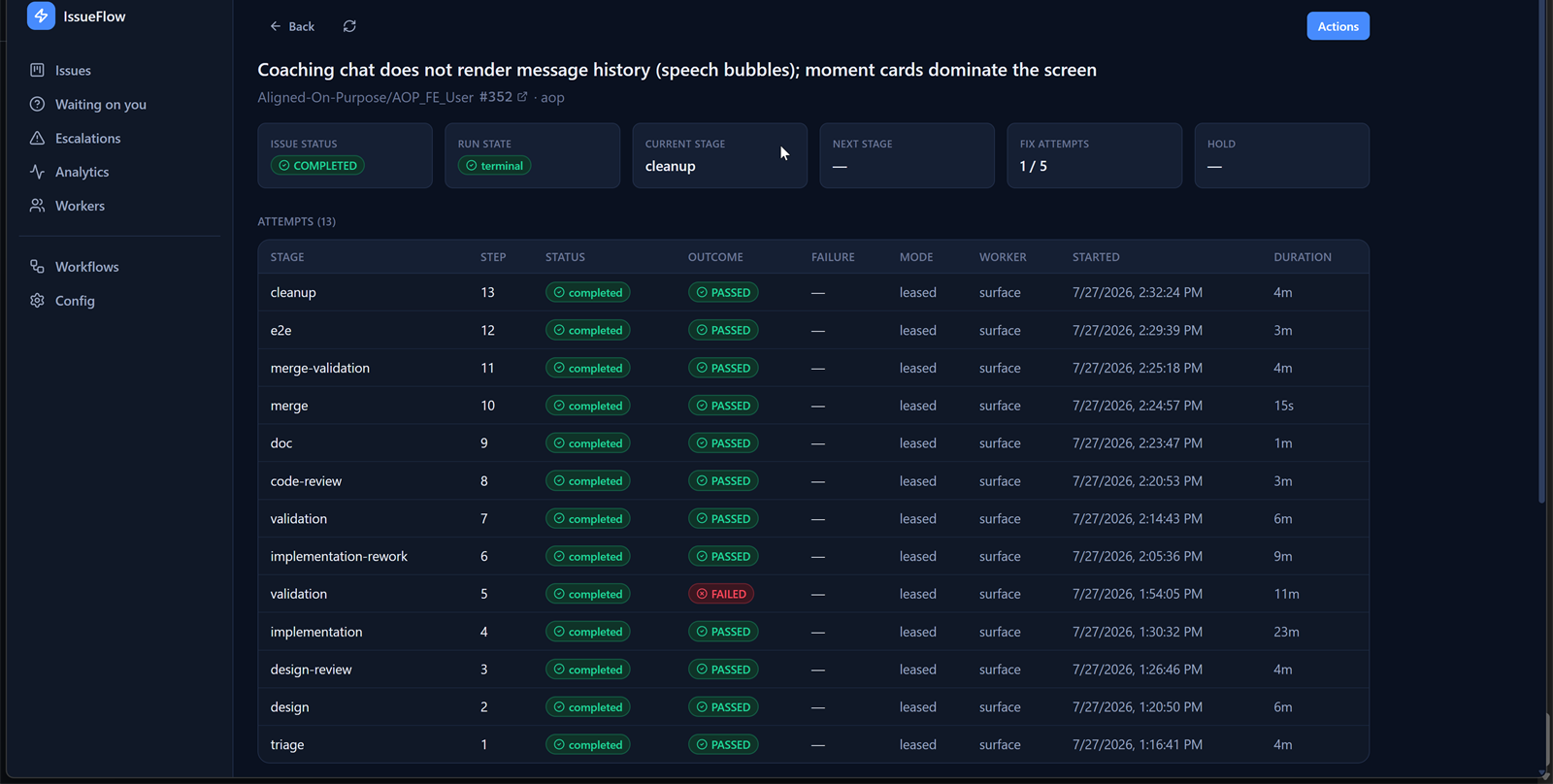
Pay for the orchestration, not the tokens.
A flat platform fee. Your own agent subscriptions and API keys.
Wire up one repo and one worker and watch a governed pipeline ship on your own code. No card.
- 1 solution, single repository
- 1 connected worker
- 1 user
- 3 concurrent stages
- Full triage → merge pipeline
- Configurable workflow & human gates
- Community support
For the solo builder running real, multi-repo work across their own machines.
- Up to 3 solutions, multi-repo
- 2 connected workers
- Up to 5 users
- 5 concurrent stages per worker
- Bring your own agent & LLM keys
- Reconciler: lost & stale-worker recovery
- Failure-aware routing & rework loops
- Email support
For a team that wants coordinated, auditable delivery with room to grow.
- Everything in Starter
- Unlimited solutions & repositories
- 5 connected workers
- Unlimited users
- Unrestricted concurrency
- Full attempt-level audit trail
- Priority support
A solution is one governed pipeline — its repositories, its workflow, and the workers that run it. Every paid tier is a flat platform fee: you bring your own agent subscriptions and LLM keys, and pay us nothing for tokens.

Automate the delivery. Keep the judgment.
Connect a repo, start from a template, and decide where you step in. Change anything after that.
Start free with GitHubFree forever on one repo and one worker. No card required.